Embedding your Vally Calendar to your site
You can embed your Vally calendar for either a trip or all of your trips, directly on your website. This allows your customers to view available dates and quickly initiate bookings.
Individual Trips Calendar
Default Embed Code
To add the calendar, simply copy and paste the html code below on the desired page in your site.
<iframe
  style="width: 400px; height: 600px"
  src="https://book.vallypro.com/embed/trips/[tripId]/calendar">
</iframe>
- Replace [tripId] with the actual trip ID from your trip.
- The width and height can be adjusted if needed.
- The default calendar look will be applied:
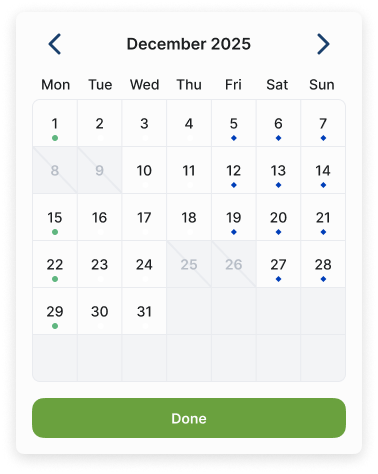
Customization Options
You can change the text and colors of the calendar by adding small pieces at the end of the link.
- First, put a ? after the link
- For each extra change, add an &
- Example: https://book.vallypro.com/embed/trips/[tripId]/calendar**?title=Trips&titleColor=#FFFFFF&**background=#F5F5F5
Let’s break it down:
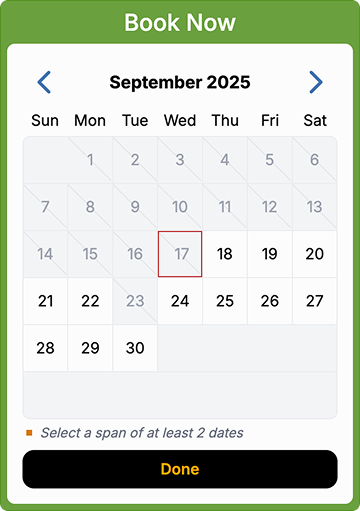
title=TitleHere→ Changes the title text at the top of the calendar (To add empty spaces, type "%20" where you want the empty space to be: for example "Book Now" should be "Book**%20**Now").titleColor=#Color→ Sets the color of the title text. Default is #FFFFFF(white).background=#Color→ Changes the background color of the calendar. Default is #F5F5F5 (light gray).buttonColor=#Color→ Sets the background color of the Done button. Default is #00AA00 (green).buttonTextColor=#Color→ Sets the text color of the button. Default is #FFFFFF(white).
Customized Example:
<iframe style="width: 400px; height: 600px"
  src="https://book.vallypro.com/embed/trips/[tripId]/calendar?title=Book%20Now&titleColor=#FFFFFF&background=#F5F5F5&buttonColor=#00AA00&buttonTextColor=#FFFFFF">
</iframe>
- Title: Book Now
- Title color: White (FFFFFF)
- Background color: Green (7BB246)
- Button color: Black (000000)
- Button text color: Orange/Yellow (FFB300)
- Result:
Global Calendar
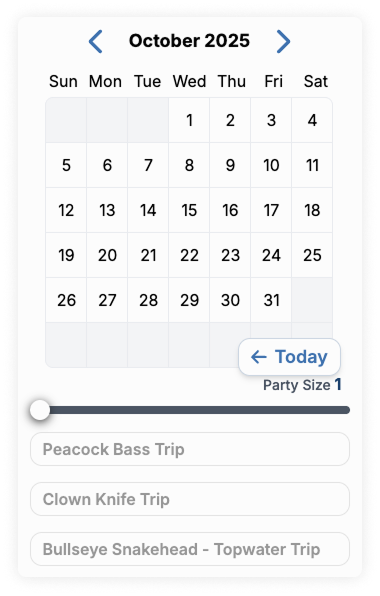
By default, the global calendar displays a list of all your trips in the embedded calendar. To add the default calendar, copy and paste the code below, replacing the "your-slug-here" with your slug from vally
<iframe sandbox="allow-forms allow-modals allow-scripts allow-popups allow-same-origin"
  src="https://book.vallypro.com/embed/your-slug-here" style="width: 400px; height: 680px;" />
An example of the default Global Calendar:
If you want the calendar to show only some of your trips:
- Add
service=trip_id_1at the end of the link (replace trip_id with your trip ID.) - To show more than one, just repeat it:
service=trip_id_1&service=trip_id_2&service=trip_id_3 - Example: https://book.vallypro.com/embed/your-slug-here?service=trip_id_1&service=trip_id_2&service=trip_id_3