Fixing issues with SMS
This guide quickly covers a few common problems that can lead to business owners and team members not receiving text message updates about their bookings and orders. Lets jump right in!
Add a Phone Number
Vally does not require users to add their phone number when setting up an account. Because of this, it is possible that your account simply does not have an associated phone and therefore Vally is unable to send you a text.
Steps:
- Visit your profile page on the portal
- Add your phone number
- Click "Update" to save
Turn On SMS Notifications
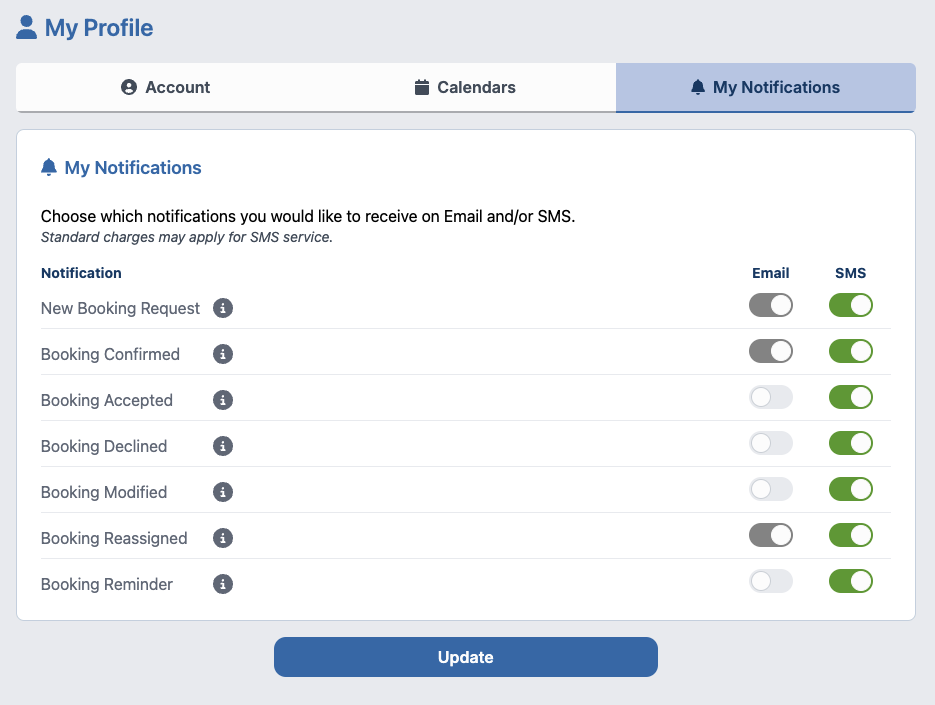
Vally keeps text message notifications off by default for the privacy of it's users. In order to receive SMS notifications you must enable them.
Steps:
- Visit your notifications page on the portal
- Turn on the alerts that your would like to receive
- Click "Update" to save