
Create Add-Ons, Discounts, and Coupon Codes
Create a promo code customers can apply in their Vally cart, or add optional extras and booking discounts to your activities.
Playback speed: 1×
The recording could not be played. Please try again.
Add-ons & Discounts
Use add-ons for optional extras, such as equipment rentals. Use discounts to reduce a booking’s price. For a promo code that customers enter during online checkout, create a Coupon Code.
Create a coupon code for online bookings
- Under Offers, expand Activity Options and select Discounts.
- Select Create Discount.
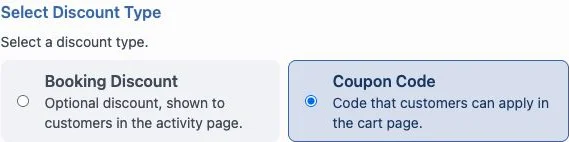
- Under Select Discount Type, choose Coupon Code. A Booking Discount is shown on the activity page. A coupon code is entered in the cart.
- Enter a Title and an optional description.
- Under Discount Settings, enter the Coupon Code you will share with customers. Set the discount amount and how it applies. Percentage coupon discounts are limited to 99%.
- Review Scenario, Active Dates, and Booking dates if the discount should apply only to certain bookings or dates.
- Under Assign to offers, select the activities the code should apply to.
- Select Save Changes.
Customers select Add Discount Code in their cart, enter the code, and select Apply. The cart shows Discount applied when the code is accepted.
If a customer sees Invalid discount code, check the code they entered. If they see This discount is not available for your selected dates, check the assigned activities and date restrictions against their booking.
How to create an Add-on or Discount
1. Under Offers, expand Activity Options. Select Add-Ons or Discounts, then select Create Add-On or Create Discount.
2. Add a title, an optional description
3. Select an amount of price or discount (which can be per person, per booking, or a percentage). Then choose the maximum quantity allowed per booking.
4. Assign it to your offers and select Save Changes. This makes the add-on or discount available for the selected activities.