Vally Vally Help
Home Docs Getting Started Changelog
Vally Portal
Vally Vally Help Home
Docs
  • Overview
  • Introduction
  • Getting Started
    • Prerequisites
    • 1. Create your account
    • 2. Downloading the app
    • 3. Set Up Business Information
    • 4. Set Up Business Policies
    • 5. Invite and Manage Members
    • 6a. Set Up Stripe (Business)
    • 6b. Set Up Stripe (Individual)
    • 7. Add and Manage Resources
    • 8. Set Up Trips/Offers
    • 9. Add-Ons & Discounts
    • 10. Explore the Dashboard
    • 11. Learn how customers can pay deposits
    • 12. Review and Manage Bookings
    • 13. Collect Final Balances
    • 14. Collect Gratuities and Extra Charges
    • 15. Issue a Refund
    • 16. Review Calendar
    • 17. Review Client Directory
    • 18. Import Calendar Events
    • Review your business emails
  • Developers
    • Adding Vally to your website
    • Set Up Google Analytics and Google Tag Manager
    • Adding an Embeded Calendar to Your Site
  • Troubleshooting
    • Why won't my booking show on the calendar?
    • Fixing issues with SMS
Changelog Vally Portal
  • Overview
  • Introduction
  • Getting Started
    • Prerequisites
    • 1. Create your account
    • 2. Downloading the app
    • 3. Set Up Business Information
    • 4. Set Up Business Policies
    • 5. Invite and Manage Members
    • 6a. Set Up Stripe (Business)
    • 6b. Set Up Stripe (Individual)
    • 7. Add and Manage Resources
    • 8. Set Up Trips/Offers
    • 9. Add-Ons & Discounts
    • 10. Explore the Dashboard
    • 11. Learn how customers can pay deposits
    • 12. Review and Manage Bookings
    • 13. Collect Final Balances
    • 14. Collect Gratuities and Extra Charges
    • 15. Issue a Refund
    • 16. Review Calendar
    • 17. Review Client Directory
    • 18. Import Calendar Events
    • Review your business emails
  • Developers
    • Adding Vally to your website
    • Set Up Google Analytics and Google Tag Manager
    • Adding an Embeded Calendar to Your Site
  • Troubleshooting
    • Why won't my booking show on the calendar?
    • Fixing issues with SMS
Browse docs
  • Overview
  • Introduction
  • Getting Started
    • Prerequisites
    • 1. Create your account
    • 2. Downloading the app
    • 3. Set Up Business Information
    • 4. Set Up Business Policies
    • 5. Invite and Manage Members
    • 6a. Set Up Stripe (Business)
    • 6b. Set Up Stripe (Individual)
    • 7. Add and Manage Resources
    • 8. Set Up Trips/Offers
    • 9. Add-Ons & Discounts
    • 10. Explore the Dashboard
    • 11. Learn how customers can pay deposits
    • 12. Review and Manage Bookings
    • 13. Collect Final Balances
    • 14. Collect Gratuities and Extra Charges
    • 15. Issue a Refund
    • 16. Review Calendar
    • 17. Review Client Directory
    • 18. Import Calendar Events
    • Review your business emails
  • Developers
    • Adding Vally to your website
    • Set Up Google Analytics and Google Tag Manager
    • Adding an Embeded Calendar to Your Site
  • Troubleshooting
    • Why won't my booking show on the calendar?
    • Fixing issues with SMS
Home / Getting Started / Review your business emails

Review your business emails

Add and manage information on the emails your customer will receive from you.

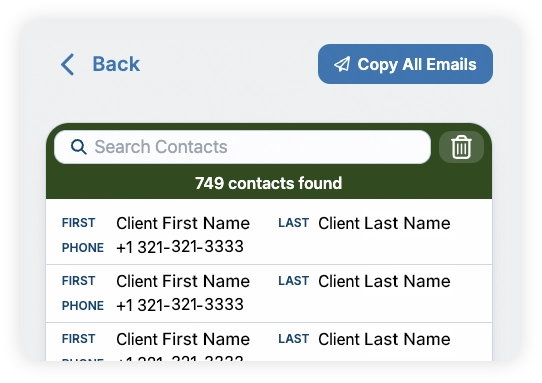
Many partners find the “Copy All Email” button on the top right handy for email marketing campaigns. This copies all the emails from your clients to your clipboard.
Emails will be send when:

  • Accepting or modifying a booking.
  • Sending a custom invoice.
  • Booking reminders before their trip.
  • Follow-ups when the bookings are completed.
Previous 18. Import Calendar Events Next Developers