Fix Missing Vally Text Message (SMS) Alerts
Not receiving Vally text messages? Check your account phone number and turn on SMS alerts for bookings and orders.
Playback speed: 1×
The recording could not be played. Please try again.
If you are not getting Vally text message alerts, check that your profile has a phone number and that SMS notifications are turned on for the alerts you want. Each user must turn on their own SMS notifications.
This guide is for business owners and team members receiving booking and order alerts.
Add a Phone Number
Vally does not require users to add their phone number when setting up an account. Because of this, it is possible that your account simply does not have an associated phone and therefore Vally is unable to send you a text.
Steps:
- Visit your profile page on the portal
- Add your phone number
- Click “Update” to save
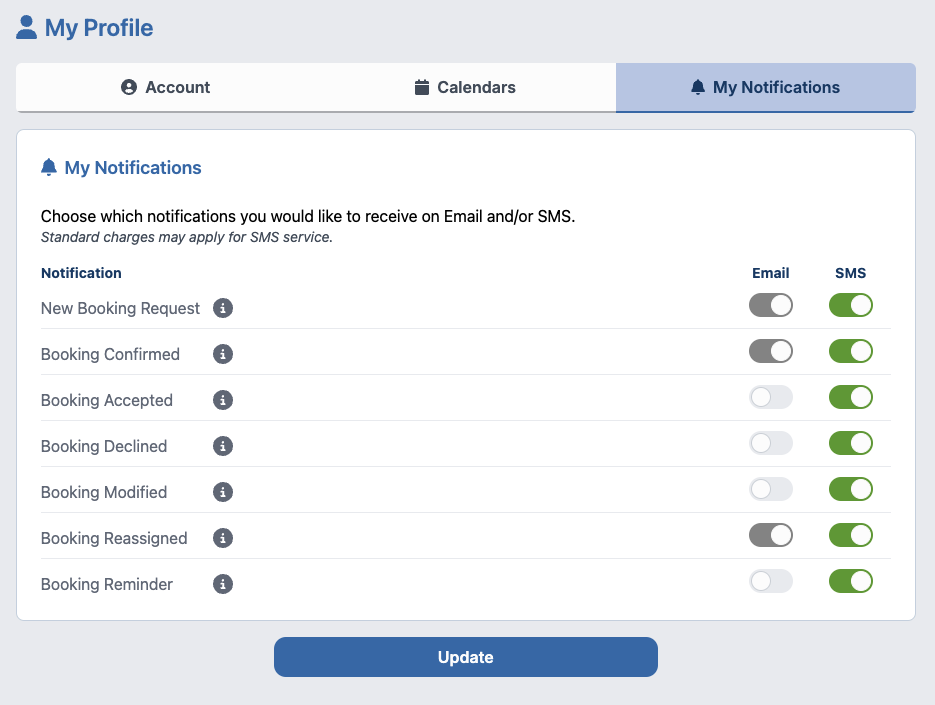
Turn On SMS Notifications
Vally keeps SMS notifications off by default for each user. Turn on the alerts you want to receive by text message.
Steps:
- Visit your notifications page on the portal
- Turn on SMS for the alerts you want to receive
- Click “Update” to save