
Add Boats, Equipment, and Guide Resources
Add boats and equipment in Offers → Resources, find guide calendars, and assign resources to Vally activities for availability checks.
Playback speed: 1×
The recording could not be played. Please try again.
Open Offers → Resources to manage the boats, equipment, accommodations, and guide calendars your business uses. Vally checks the calendars assigned to an activity when customers choose a booking time.
For captains and guides who need their own Vally account and calendar, invite them as staff. Use Add Resource for non-people resources such as a boat or cabin.
To add a resource
- Open Offers → Resources and select Add Resource.
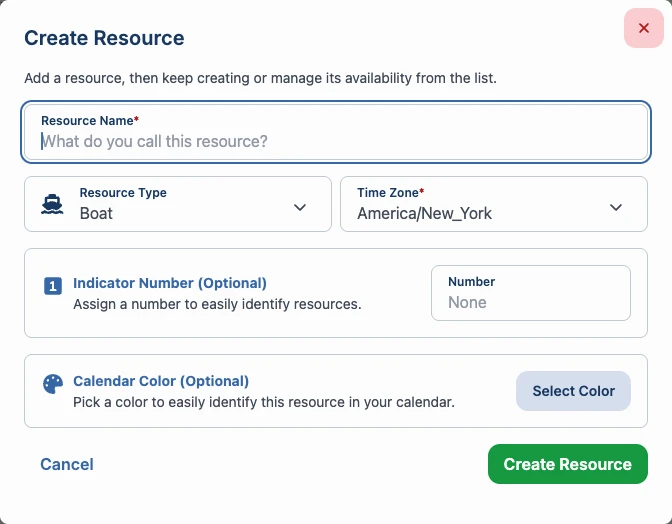
- Enter a Resource Name your team can recognize, such as “Silver Pontoon” or “Cabin 1.”
- Choose the Resource Type and confirm the Time Zone.
- Optionally, set an Indicator Number and Calendar Color to distinguish similar resources on the calendar.
- Select Create Resource. The new resource appears in the Resources list with its own calendar.
If Add Resource is unavailable, ask an admin to check your role’s calendar-management permissions. If Vally says you have reached the calendar creation limit, try again later.
Use the resource for bookings
Creating a resource does not assign it to an activity. Open Offers → Activities, edit the activity, and choose the calendars and resources in Assignments. See Set Up Activities for the full setup.
To change a resource later, open it from Offers → Resources and select Save changes after editing its details.