
Review Client Directory
Find customer contact information and copy customer email addresses from the Vally client directory.
Playback speed: 1×
The recording could not be played. Please try again.
The Client Directory contains all of your clients’ contact information, such as names, emails, and phone numbers. Besides importing or adding contacts, Vally also creates client records from bookings and invoices.
Find a client
- In the Portal menu, find Business.
- Select Client Directory.
- Use Search to find a client by their contact information.
- Use All Activities to show clients connected to selected activities.
- Select View to open a client’s record.

Review a client
A client’s record shows their contact information and recent activities. Depending on your permissions and available client information, you can:
- Call, text, or email the client.
- Select Edit to update their name, phone number, or email address.
- Review their order and booking history.
- Add or update client notes.
- Review linked payment records and saved cards.
- Select Add Contact to download the client as a contact file.
- Select Download CSV to download that client’s information.

Export contacts or copy email addresses
To make it easy for you to use customer contact information outside Vally, you can select the clients you need and export only those records.
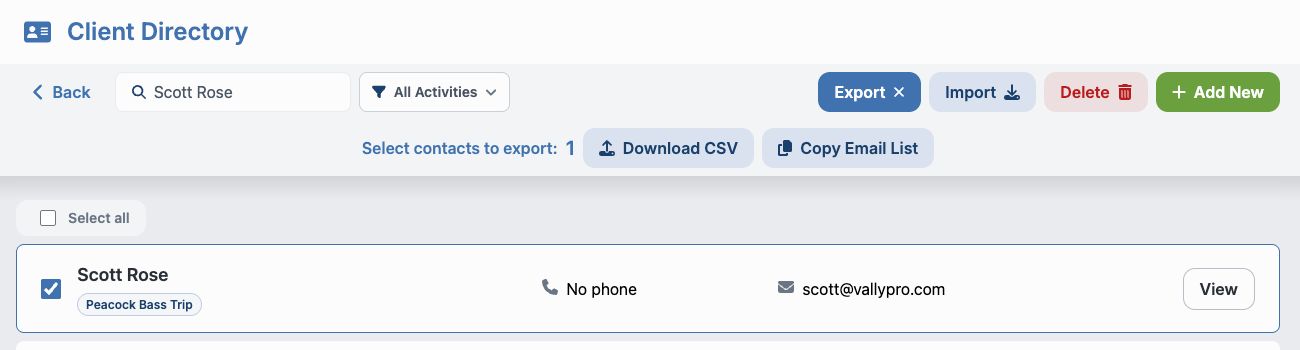
- Select Export.
- Select each client you want to include, or choose Select all.
- Select Download CSV to download the selected contacts, or Copy Email List to copy their email addresses.
- When emailing multiple customers, paste the addresses into the BCC field so customers cannot see each other’s email addresses.
Select Export again to leave selection mode.
Add, import, or delete clients
- Select Add New to create one client record.
- Select Import to add multiple clients from a file.
- Select Delete, choose the client records, and confirm the deletion to permanently remove them.
Available controls depend on your Client Directory permissions.
Your data is yours
Vally respects you and your clients’ privacy and ensures their information is used solely for purposes related to their bookings. This includes confirmation emails, reminders, and follow-ups for existing bookings. We do not use or access your Client Directory for any other purpose.