
Embed a Vally Calendar on Your Website
Add a Vally availability calendar to your website. Embed one trip or all activities, connect the booking widget, and customize calendar colors.
Playback speed: 1×
The recording could not be played. Please try again.
You can embed one trip calendar or your complete Vally calendar on your website so customers can view availability and start a booking.
Before you start
Install the Vally booking widget once in your website’s <head>. The calendar uses that script to open the booking page when a customer chooses dates and continues. If you only want the calendar on your page, add data-button="false" to the widget script to hide its floating Book Now button.
Use the business slug from your booking page URL. In https://book.vallypro.com/p/peacock-adventures, the slug is peacock-adventures. For an individual trip, also copy the trip ID from its URL, after /trips/.
Paste the iframe code into the HTML section of the page where the calendar should appear. Replace the placeholders with your own business slug and trip ID before publishing.
Individual Trips Calendar
Default Embed Code
Use this example to show availability for one trip:
<iframe
  title="Trip availability"
  sandbox="allow-forms allow-modals allow-scripts allow-popups allow-same-origin"
  style="width: 400px; height: 600px"
  src="https://book.vallypro.com/embed/your-business-slug/trips/your-trip-id/calendar">
</iframe>- Replace
your-business-slugandyour-trip-idwith the values from your booking page. - The width and height can be adjusted if needed.
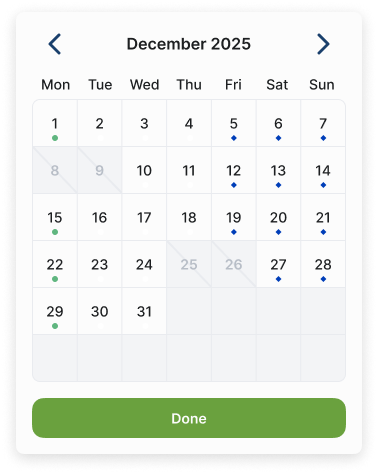
- The default calendar look will be applied:
Customization Options
Add ? before the first setting in the iframe URL. Separate later settings with & in HTML code, or & when working with the URL itself.
Encode spaces as %20 and the # in a hex color as %23. A literal # starts a URL fragment, so the calendar will not receive the rest of your settings.
| Setting | What it changes | Default when omitted |
|---|---|---|
title=Book%20Now | Heading above the calendar | No heading |
titleColor=%23FFFFFF | Heading text color | Black |
background=%237BB246 | Background around the calendar | #fcfcfc |
buttonColor=%23000000 | Done button background | Vally’s standard button style |
buttonTextColor=%23FFB300 | Done button text color | Vally’s standard button style |
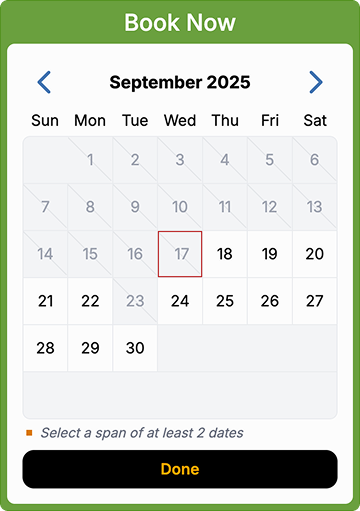
Customized Example:
<iframe
title="Trip availability"
sandbox="allow-forms allow-modals allow-scripts allow-popups allow-same-origin"
style="width: 400px; height: 600px"
src="https://book.vallypro.com/embed/your-business-slug/trips/your-trip-id/calendar?title=Book%20Now&titleColor=%23FFFFFF&background=%237BB246&buttonColor=%23000000&buttonTextColor=%23FFB300">
</iframe>- Title: Book Now
- Title color: White (FFFFFF)
- Background color: Green (7BB246)
- Button color: Black (000000)
- Button text color: Orange/Yellow (FFB300)
- Example appearance: Dates and availability will reflect your own trip.
Global Calendar
The global calendar displays your publicly visible activities. Replace your-business-slug with your business slug:
<iframe
  title="Activity availability"
  sandbox="allow-forms allow-modals allow-scripts allow-popups allow-same-origin"
  src="https://book.vallypro.com/embed/your-business-slug"
  style="width: 400px; height: 680px;">
</iframe>
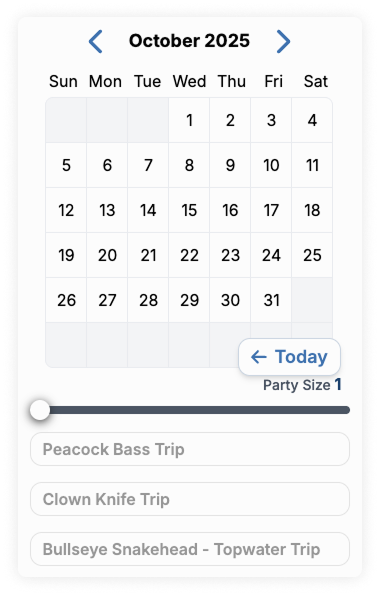
An example of the default Global Calendar:
If you want the calendar to show only some of your trips:
- Add
?service=your-trip-idto the URL to show one trip. - Repeat
serviceto show several trips. In the HTMLsrcattribute, use?service=trip-id-1&service=trip-id-2and replace both trip IDs.
Check your calendar
Preview your website on desktop and mobile. Confirm that the intended activities and calendar colors appear, then choose dates and continue to the booking page without submitting a booking. With the widget’s default settings, booking continues in a popup on desktop and a new tab on screens narrower than 1024 pixels. See the booking widget guide for mobile popup settings.
If the calendar appears but continuing does nothing, check that the booking widget script is installed on the same page. If colors are missing, check for a literal # in the iframe URL and replace it with %23.